
gearheart
Voice Service that
Keeps You Talking
Stay connected with landline home phone
Your one click away from the best service in Eastern Kentucky
65+ Years & Going
For over 65 years, Gearheart Phone has been your trusted local connection—keeping you close to the people you love.
Find Out More ⟶
Calling Features
Your Home Phone comes packed with the powerful calling features you know and love—at no extra cost.
Find Out More ⟶
Bundle & Save
Gearheart offers plenty of bundle options to help you save money every month. Check out all the ways you can save.
Find Out More ⟶
More Stuff
Gearheart offers powerful calling features and reliable phone service that keeps you connected and talking.
Find Out More ⟶
Phone FAQs
Want to know more about Gearheart Phone? Or have a question about Grearheart Phone? Check out our FAQs.
Find Out More ⟶
Service area
We have a large service area that ensure that all our customers get the best and most reliable phone service.
Find Out More ⟶

Serving You for 65+ Years.

Gearheart Local Calling Features.
Learn more about all of our Gearheart calling features right now. All these services are included with our home phone service.

If you have Caller ID, Anonymous Call Rejection/Anonymous Call Block allows you to reject calls from people who have blocked the display of their telephone numbers and caller information.
To Activate Anonymous Call Rejection/Anonymous Call Block
1. Lift the handset and listen for a dial tone.
2. Press 7 7 (Rotary dial 1.1.7.7).
3. A recording or confirmation tone will tell you that your
Anonymous Call Rejection/Anonymous Call Block is on.
To Cancel Anonymous Call Rejection/Anonymous Call Block
1. Lift the handset and listen for a dial tone.
2. Press 87 (Rotary dial 1.1.8.7)
3. A recording or confirmation tone will tell you that your
Anonymous Call Rejection/Anonymous Call Block is off
Caller ID is a feature that allows you to know who is calling you before answering the phone. Normally, the number of the caller is displayed on the phone. If you have a contact entry for the caller in your contact list, their name appears. But that’s the name you have entered in your phone. You can see the name of the person as registered with his service provider, by subscribing to a flavor of the caller ID service called caller ID with name.
With traditional phone systems, you very often miss important calls because you are already on a conversation on the phone. Any person calling you while your line is engaged hits against an annoying beep asking them to hang down. With call waiting, you no longer miss important calls. If you are already on the phone and another person calls you, hear a special beep notifying you of this, and you can choose between putting that call on hold, taking it immediately and putting the first call on hold, or sending the second call to voicemail.
HOW DO I USE IT?
1. Dial *70 to De-Activate your Call Waiting Feature option on your Digital Phone.
With 3-Way Calling, you can get a taste of phone conferencing: you can speak to two other persons at the same time, making a three-person conversation. If you have to discuss about something among friends, or with your mom and brother at the same time, 3-way calling is very helpful.
HOW DO I USE IT?1. Press the switchhook for half a second & release. This puts the original call on hold.2. Listen for three short tones, then a dial tone.3. Dial the number of the third person. After the third person answers, you may talk with them before returning to the original call.4. To return to the original call and complete the three-way calling, press the switchhook for half a second & release immediately.Camp-On allows you to complete a transfer to a busy extension. The call is put on hold until the extension can receive a call; then it rings automatically. While the call is on hold, the caller (inside or outside) hears special ring back. A Call Waiting tone sounds at the busy extension to indicate that a call is waiting. If you do not answer the call within the programmed Camp-On return interval (30-300 seconds), the call returns to the originator. The originator hears a priority ring (one ring and two beeps) to indicate a returning Camp-On call.
HOW DO I USE IT?1. After placing a call that can’t be completed because the line is busy, hang up and then pick up the receiver and listen for a dial tone.2. Dial *66 and follow the recorded instructions.3. To de-activate: Hang up and then pick the receiver back up and dial *86. Some electronic digital phones will not provide a distinctive ringing pattern, however, the Automatic Callback feature will function with a normal ring pattern.Speed dialing allows you to dial your most frequent contacts by pressing only one or two digits. For example, you can set your phone such that it dials your mum when you press 1, and your boss when you press 0, and so on. With speed dialing, you no longer need to remember long 11-digit numbers and make mistakes while dialing them.
HOW DO I USE IT?1. Listen for the dial tone, then dail the activating code (74 for the 8-number list, 75 for the 30-number list). If you are using a Touch-Tone phone, press the # key after your press 74 or 75.2. Listen for a second dial tone, and the dial the code number you want to assign to a specific phone number.3. Dial the telephone number. Two short tones confirm that the code has been programmed.Call trace is the ability to mark an incoming call as offensive, an emergency or requiring tracing or follow-up, such as a bomb threat, an obscene caller, or a caller who is having a medical emergency.
HOW DO I USE IT?1. After receiving a call which you want to trace, hang up and then pick up the receiver and dial *57. An announcement will inform you that the trace feature has been activated and provides you with instructions on how to proceed with or abort the trace.Voicemail is a voice message that a caller leaves when the person called is absent or is taken up with another conversation. The voicemail feature acts in a way similar to the old answering machine, but with the main difference that instead of the voice message being stored on your answering machine, it is stored on the service provider’s server, in a space reserved for the user called a mailbox. It is not very different from email, save that the messages are voices instead of text.
Call forwarding allows you to forward incoming calls from your phone to any other phone or to voice mail. You can thus be sure not to miss any call while you are away from home or office. What does forwarding a call mean? It simply means that when your phone rings at home, and you are not there, the call is transferred to another phone (depending on what you have set before leaving).
HOW DO I USE IT?1. Lift the receiver and dial *72.
2. Listen for a second dial tone and then dial then dial the number to which you want your calls forwarded. Two short tones will indicate success.
3. When the other telephone is answered, Call Forwarding is in effect. Stay on the line for five seconds. If the line is busy or there is no answer, hang up and immediately repeat the first three steps. Call Forwarding will be established automatically with you hear two short tones plus a dial tone. No answer is required to activate Call Forwarding on the second attempt.
4. To cancel Call Forwarding, dial *73 and listen for two short tones and a dial tone.
5. Selective Call Forwarding: Dial *64 and follows the recorded instructions.
Voicemail is a voice message that a caller leaves when the person called is absent or is taken up with another conversation. The voicemail feature acts in a way similar to the old answering machine, but with the main difference that instead of the voice message being stored on your answering machine, it is stored on the service provider’s server, in a space reserved for the user called a mailbox. It is not very different from email, save that the messages are voices instead of text.
HOW DO I USE IT?Accessing you Mail-Box1. Dial [606] 478-6245 Then either: * Press # if calling from the phone your voice mail is assigned to, OR * If using Auto-Login and accessing from your home, no entry is required, OR * Enter your telephone number, if calling from a remote phone. 2. If requested, Enter your password, followed by the # key. Your password will be default of four zeros (0000) until you change it. 3. Main menu: Press 1 to retrieve messages, Press 3 to send, Press 7 for current date and time, or Press 9 for mailbox set-up. To Set-up Mailbox:1. Options of Mailbox Set-up: *Press 1: Greeting options (you can disregard this step if you choose to use the default greeting) * Press 2: Change password. * Press 3: Notification Options (1) * Press 4: Disable/Enable Auto Log-in. * Press *: Return to Main Menu. To change your greetings: 1. Press 1: Greeting options. 2. Press 2: Re-record your greeting. 3. Press #: End recording function. 4. Press 1: Listen to greeting. To create multiple greetings: 1. Press 5: Pick a new greeting. Then choose greeting # (2-9). 2. Press 2: Record greeting. 3. Press #: End recording function. Repeat steps 5 & 6, choosing a different greeting # each time. 4. Press 5: Pick a new greeting. Then choose the greeting you wish to become active. 5. Press *: Return to main menu. Listen to messages: 1. Press 1: Play or replay messages. 2. Press 2: Save message and to next. 3. Press 3: Delete message and go to next. 4. Press 4: Save message as new. 5. Press 5: Reply to message. (1) 6. Press 6: Forward message. (1) 7. Press 7: Skip back three seconds. 8. Press 8: Pause or continue message. 9. Press 9: Skip forward three seconds. 10. Press *: Return to main menu. Voice-Mail Instructions 1. Dail: 478-MAIL or 452-MAIL 2. Press * 3. At this point, an automated system will instruct you how to set up your greeting, pass code, and name. 4. Beginning with the 2nd time you dial in, you will need to press #, then your 4-digit pass code in order to retrieve your messages. All forwarding will point to 478-6245 for every mailbox. The customer will call into their box by dialing (478-6245) from the number that has voice mail activated. The system will log the user in without a pass code. If the customer calls their Voice Mail from a different number, they will be asked to enter the voice mailbox number and their pass code. Ex. (6064781234) the mailbox number, (0000) the default pass code.Contact Lists allow you to customize your Caller ID so that the name displayed for a contact is the one that you want to see. You are already enjoying this feature with your mobile phone.
You can view all your incoming, outgoing, and missed calls for your Inter Mountain Phone account. How does it help? You learn that a week ago you missed an important call. You have cleared your Caller ID from your phone. How do you track down that number? Check your Call Logs! All your calls incoming, outgoing, and missed are all available by date and time. To obtain a copy of your Incoming Call Logs, please call (local) 606.478.2500 – (long distance) 1.888.921.2525 and request a copy to be sent to your email address.
Wherever you go, you can have your calls follow you! Find Me allows incoming calls to “find you” at multiple phone numbers, one after another. If you don’t pick up at one number, the call will move on to the next, until either you pick up or the call terminates.
*69 Automatic Callback
*89 Cancel Automatic Callback
*66 Automatic Recall
*86 Cancel Automatic Recall
*72 Call Forward Activate Code
*73 Call Forward Deactivate Code
*62 Call Forward Busy Activate Code
*63 Call Forward Busy Deactivate Code
*52 Call Forward No Answer Activate Code
*53 Call Forward No Answer Deactivate Code
*82 Call Forward Don’t Answer After Call Waiting
*83 Cancel Call Forward Don’t Answer After Call Waiting
*70 Cancel Call Waiting
*57 Customer Originated Trace
*82 Directory Number Privacy (all calls)
*67 Directory Number Privacy (per call)
*64 Selective Call Acceptance
*63 Selective Call Forwarding
*60 Selective Distinctive Alert
*75 Speed Calling 30
*74 Speed Calling
*94 Toll Restriction with PIN
*77 Unidentified Call Rejection
*87 Cancel Unidentified Call Rejection
Phone Bundles Built for You.
Fusion Duo Talk
Home Phone + 1 Gig Internet-
Home Phone Service
-
Unlimited Local & Long Distance
-
Keep Your Same Number
-
1 Gig High-Speed Internet
-
(2) Managed WIFI-6e Pods
-
24/7 Priority Support
Fus. Duo Talk / TV
Broadband + Premium GTV + STARZ Basic-
Home Phone Service
-
Unlimited LD & Features
-
GTV Premium
-
Free Access to TiVo+, PLEX & Pluto TV
-
(1) TiVo Force 1 Android Box
-
STARZ Basic Included
Fus. Talk + Econo
Broadband + Econo GTV + STARZ/ENCORE-
Home Phone Service
-
Unlimited LD & Features
-
GTV Economy + FREE TiVo Plus
-
450 Meg Internet + 1,500 Gig Data
-
(1) TiVo Force 1 Box + Managed WIFI
-
STARZ/ENCORE Included
You will no longer be able to access the Internet using a local, unlimited dial-up connection; i.e., you will have to depend on your wireless phone for Internet service; in certain instances, you may be able to connect your wireless phone to your PC to access the Internet, but you are likely to need additional hardware and/or software to enable your wireless phone to communicate with your PC; in any case, you need to keep in mind that your time spent on the Internet will count against the minutes in your wireless plan.
- You will be unable to reach someone at home who does not have their cell phone turned on or with them.
- You must keep your wireless phone charged at all times in order to use it. If the power goes out and your wireless phone is not charged, or the battery wears down, you will have to wait for power to be restored before you can charge your phone.
- If you take your wireless phone with you, other members of your family will be without a telephone. Are you going to purchase a wireless phone for every member of your family?
- In a home emergency, or hazardous weather condition, your landline telephone may be the most reliable.
- Should you decide to re-connect your wireline phone service in the future, you will be responsible for applicable set-up fees and charges to connect your home phone.
- In general, a phone number can only be assigned to a single wireless phone. With a traditional wireline phone, you can have many phones (or extensions) in your house that hook-up to the same number. Typically, wireless phones can’t share numbers. With your wireless phone there are additional charges to share or ring one number.
- If your home is in an area that does not enjoy clear wireless reception, your calls might be patchy, unclear, or have a tendency to drop. Be aware of your surroundings and the type of reception that your wireless phone gets at home, as this is the type of service quality you’ll have for all your calls.
- THE BOTTOM LINE—STAY CONNECTED WITH COALFIELDS TELEPHONE.
Hundreds of long-distance companies are trying to get your business but how many of them do you really know? How many of them have a proven track record? How many will keep their promises to you? With Coalfields Long Distance, you don’t have to ask yourself these questions. You get your long-distance service from someone you already know and trust – Geahreart Telephone.
Gearheart Long Distance has all the qualities you’ve come to expect from your local service provider.
You’ll get long-distance service with the same qualities that characterize your local service – reliability, accessibility, and overall integrity.
- You’ll benefit from consistent rates – rates competitive with those of other long distance carriers.
- You’ll receive worldwide access, just as you would with another carrier – and you’ll get it through one simple, local connection.
- You’ll appreciate knowing there’s only one bill for your local and long-distance services – including calling cards and 800 numbers.
Direct dial if you wish to talk with anyone who answers. Rates for calls that you dial yourself are lower than for calls dialed by the operator. Charging begins when the called telephone is answered in person or by an automatic answering machine.
To call within your area code:
Dial 1 + Area Code + Telephone number
To call outside your area code:
Dial 1 + Area Code + Telephone number
Long Distance Directory Assistance:
For local numbers not found in this directory:
Dial 1 + Area Code + 555-1212
For other numbers within your area code (606) and for numbers outside your area code:
Dial 1 + Area Code + 555-1212
Directory Assistance calls outside Area Code 606 will be handled and billed by the long distance company you have selected for your 1 + long distance calls outside Coalfields Telephone Company’s service area. Please contact your long distance company for their Directory Assistance rates.
Wrong Number Credit / Poor Connection:
If you dial a wrong number, call the “0” Operator and give the number you attempted to reach. You’ll be credited for the call.
Once in a while you may get a bad connection or be cut off on a long distance call. Both parties should hang up and the one who placed the call should dial the “0” Operator and explain the trouble. The operator will get you a better connection and have the charges adjusted appropriately.
To verify your choice of long distance carriers, dial 1 + 700 + 555-4141 from the phone that uses the long distance carrier. If you are a Coalfields Long Distance customer, dial 1 + 700 + 555-0003 to verify your choice.
[0] Dialing Instructions:
To reach a Coalfields Telephone Company operator: Dial 0
To reach your long distance company’s operator: Dial 00
Not all long distance companies will choose to offer operator services. Contact your long distance company for more information.
Operator Assist Dialing:
The following types of long distance calls are available through Coalfields Telephone Co. for calls that are within the Winchester LATA. Information about the types of calls available outside the Winchester LATA can be obtained by contacting your selected long distance company.
Collect or Person-to-Person calls, calls charged to another number or to a Calling Card, calls placed from coin phones or from hotel guest phones, or calls for which Time and Charges are requested are Operator-Assisted calls. Higher rates apply to station calls dialed by the operator, Collect calls, Person-to-Person calls, calls billed to a Calling Card or to another number.
Collect and Calling Cards:
To call within your area code:
Dial 1 + Area Code + Telephone Number
To call outside your area code:
Dial 0 + Area Code + Telephone Number
Calling Card Service
From Touch Callingphones:
Touch 0 + Area Code + Telephone Number
(wait for tone or tone and announcement)
+ Calling Card Number:
(may not be available in all areas)
From Dial phones:
Dial 0 + Area Code + Telephone Number
(give Operator your Calling Card Number)
Person-To-Person Calling:
Place the call with the operator if you wish to talk to a particular person or extension. Charging starts when the conversation begins. Rates are highest for Operator-Assisted Person-to-Person calls.
Additional Services:
• Conference Calls – You can talk with several people in different places at the same time. Tell the operator you wish to make a “conference” call. A special charge will be made for this type of call.
• Collect and Card Calling – Call Collect if the person or firm you are calling agrees to pay the charge. You can also bill calls to your Calling Card or to another number. Place these calls with the operator. Operator-Assisted rates apply.
• Overseas Calls – Calls to most of the world’s telephones can be made from your phone. Dial the operator and give the name of the country you wish to call. Rates and reduced rate periods on calls to other countries differ from those on calls to U.S. points.
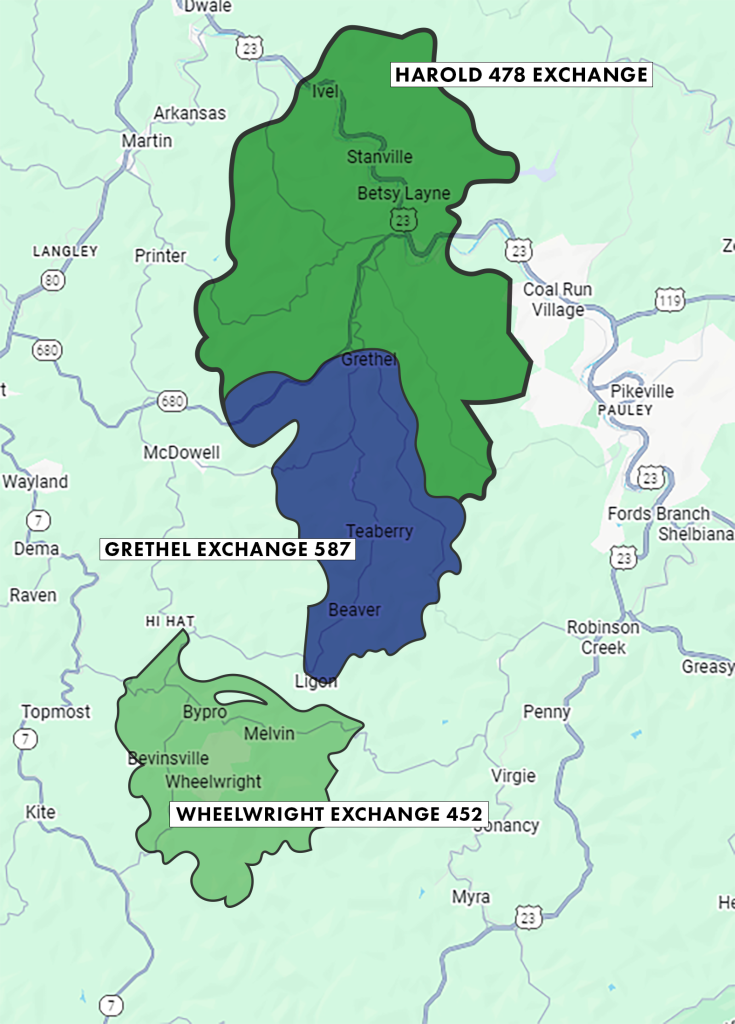
Gearheart Home Telephone has been servicing the fine folks of Wheelwright, Harold and Grethel for the past 65+ years and were not slowing down. We pride ourselves in offering the BEST in Telephone, Broadband and Digital TV in Eastern Kentucky. The map of our Coalfields Telephone and Broadband Service Area is bellow.
*Most areas that are listed on the map can receive all Telephone, DSL Internet and IMC Digital TV services. Note: VoIP Digital Phone IS NOT available in the Coalfields Service Area.
Be Aware of Spoofing
Caller ID spoofing is a practice that allows a caller to disguise their identity by falsifying the phone number that appears on your caller ID display. Much like email spoofing, where a message can appear to come from any address the sender chooses, caller ID spoofing can make a call seem as though it is coming from any number the caller wants. This service is offered by various vendors and typically works by allowing the caller to input their own number, the number they are calling, and the number they want displayed to the recipient. The service then connects the call while presenting the false caller ID information.
While caller ID spoofing is often used for harmless prank calls—such as making it appear a call is coming from a well-known organization—it has increasingly been used for criminal purposes. According to industry experts, spoofing is commonly associated with identity theft and vishing, also known as voice phishing, where callers attempt to trick individuals into revealing sensitive personal or financial information. Some telemarketers also use spoofing to disguise their true calling numbers.
Coalfields Telephone wants to make our customers aware that caller ID spoofing can happen to anyone and encourages you to remain alert when receiving unexpected or suspicious calls. Never share personal or financial information over the phone unless you are certain of the caller’s identity. For more information about phone scams and how to protect yourself, please visit www.coalfields.net/phone/scam
USDA’s Rural Utilities Service (RUS) administers programs that support essential infrastructure and infrastructure improvements in rural communities across the nation. These programs focus on critical services such as water and wastewater treatment, electric power, and telecommunications—all of which play a vital role in expanding economic opportunities and improving the overall quality of life for rural residents.
Through its Telecommunications Program, USDA Rural Development helps enhance life in rural America by providing capital for the deployment of modern telecommunications infrastructure. This commitment ensures that rural communities have access to affordable, reliable, and advanced telecommunications services comparable to those available in urban and suburban areas throughout the United States.
USDA Rural Development is an equal opportunity provider and employer. Individuals who wish to file a Civil Rights program complaint of discrimination may complete the USDA Program Discrimination Complaint Form, available online or at any USDA office, or request a form by calling (866) 632-9992. Complaints may be submitted by mail, fax, or email as outlined by the U.S. Department of Agriculture.

Before starting any digging project, Kentucky law requires homeowners and contractors to contact Kentucky 811 to have underground utilities located and marked. By calling 811 or submitting a request online, you help protect yourself, your property, and essential services like gas, electric, water, and telecommunications lines from accidental damage. Requests should be made at least two full working days before digging begins, allowing utility operators time to mark their lines. This free service helps prevent costly repairs, service outages, and serious safety hazards—making it a simple but critical step for any excavation project. To learn more or submit a locate request, visit https://www.kentucky811.org.
Limited-Time Offers Promotional offers are subject to change or cancellation at any time. Offers available to qualified residential customers in good standing. New customer eligibility and/or return-customer restrictions may apply. Standard rates apply after promotional period. Not all services, speeds, or promotions are available in all areas. Restrictions apply.
Internet Service Details Actual speeds may vary and are not guaranteed. Internet speeds are subject to network conditions, device capability, in-home Wi-Fi performance, location, and other external factors. Certain speeds may require compatible modem/router equipment. Equipment rental fees, installation fees, taxes, and regulatory charges may apply. Services are subject to Gearheart’s Terms of Service and Acceptable Use Policy.
Availability & Service Limitations Service availability varies by location and network capability. Some services may not be available in multi-dwelling units or remote locations. Service installation is subject to address qualification, credit approval where applicable, and completion of necessary construction or infrastructure requirements.
TV / Streaming Services (If Applicable) Channel lineups, program availability, and video app access vary by package, location, and device compatibility. Separate subscriptions may be required for certain streaming platforms. Gearheart is not responsible for the content, programming, or functionality of third-party streaming providers. Cloud DVR, On-Demand, and watch-anywhere features may require compatible equipment and Internet connectivity.
Mobile Service (If Applicable) Mobile offers apply to eligible customers only. Pricing, availability, and plan features are subject to change. Device compatibility required. Additional fees, surcharges, and taxes may apply. Service may be slowed, suspended, or terminated for misuse or excessive network usage in accordance with Mobile Service Terms.
Bundles & Promotional Inclusions Bundled services require maintaining all qualifying services to retain promotional pricing or included benefits. If one bundled service is canceled, remaining services may revert to standard pricing. Promotional streaming, subscription benefits, or add-ons (where offered) are valid only while customer remains on eligible plan. One promotional benefit per qualified account unless otherwise stated.
Equipment & Installation Certain services require leased or purchased equipment. Unreturned or damaged leased equipment may result in fees. Professional installation or activation fees may apply. Self-installation availability varies by service and location.
Billing & Fees Pricing excludes applicable taxes, regulatory fees, surcharges, and recovery fees unless otherwise stated. Late payment or non-pay status may result in service interruption or termination in accordance with Gearheart policy.
Performance & Claims Any performance claims are based on internal testing, independent studies, or industry reports applicable at the time of publication. Performance results may vary by market or location.
Use & Terms All services are governed by applicable Gearheart Broadband Terms and Conditions, Acceptable Use Policy, Privacy Policy, and Service Agreements. Continued use of services constitutes agreement to all applicable policies.
General Restrictions Not all offers, products, or services are available in all service areas. Eligibility, offers, and participation may vary. Additional restrictions may apply.
Ready to Get Connected?
It’s easy, just click the button bellow and use our online order section. Add the services you want, fill in your info, and you are ready to go!